
Description
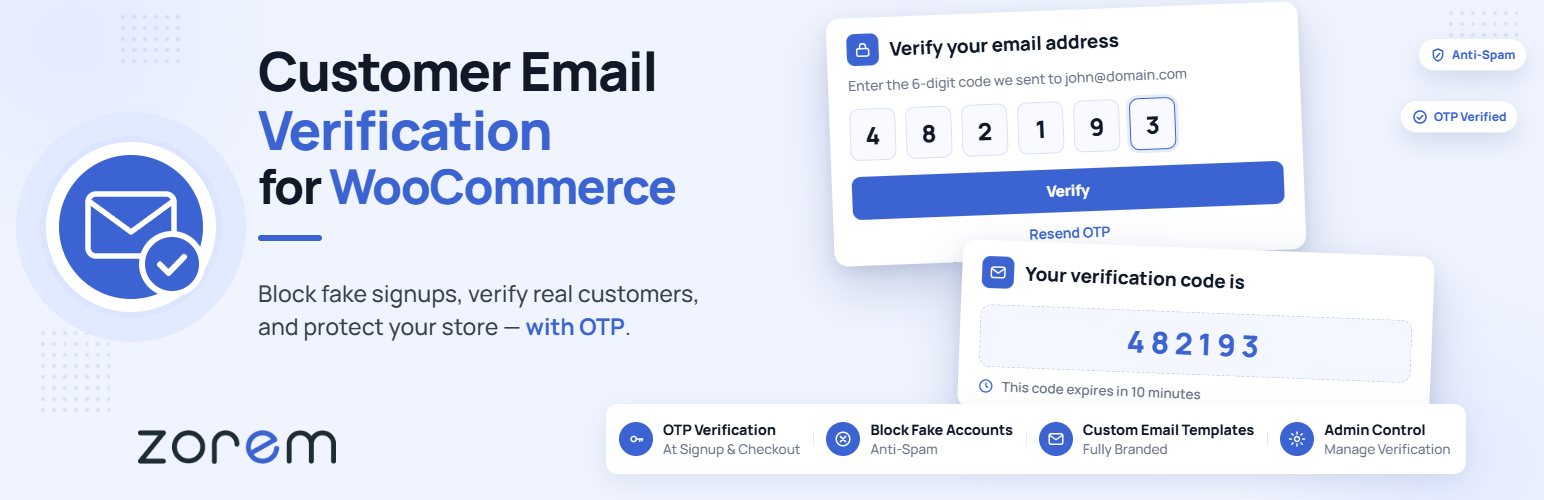
Customer Email Verification for WooCommerce stops fake accounts and spam registrations at the source. When a customer tries to register on your WooCommerce store, they must verify their email address with a one-time OTP code before their account is created — no unverified accounts, no disposable emails slipping through.
The verification popup appears seamlessly during registration, the OTP is sent immediately via WooCommerce’s email system, and accounts are only created after successful verification. Setup takes minutes, requires no coding, and works out of the box with WooCommerce’s standard registration flow.
HPOS Compatible · 2,000+ Active Stores · Free & Open Source
How It Works
- A customer enters their email and clicks to register on your WooCommerce store.
- A verification popup appears and an OTP code is sent to their email address immediately.
- The customer enters the OTP. If correct, their account is created. If not verified, no account is created.
Fake email addresses fail at step 2. Disposable addresses that receive the OTP but belong to bots are stopped at step 3.
What’s Included in the Free Version
- OTP-based email verification at registration — Customers must verify their email with a one-time code before their WooCommerce account is created. No verification, no account.
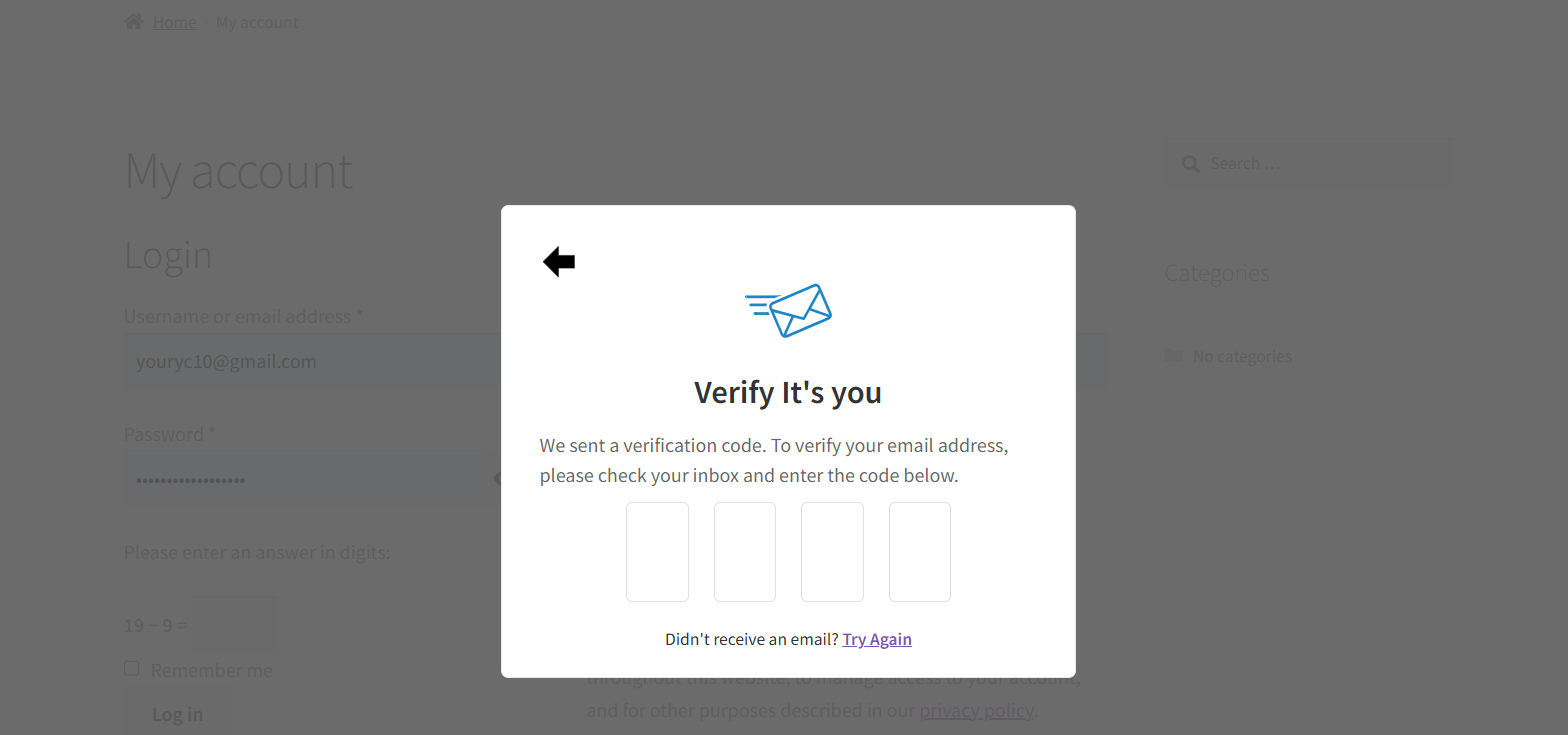
- Verification popup on the registration form — A modal popup appears instantly after the customer enters their email, prompting them to check their inbox and enter the OTP. No page reload required.
- Resend OTP option — Customers can request a new OTP if they didn’t receive the first one.
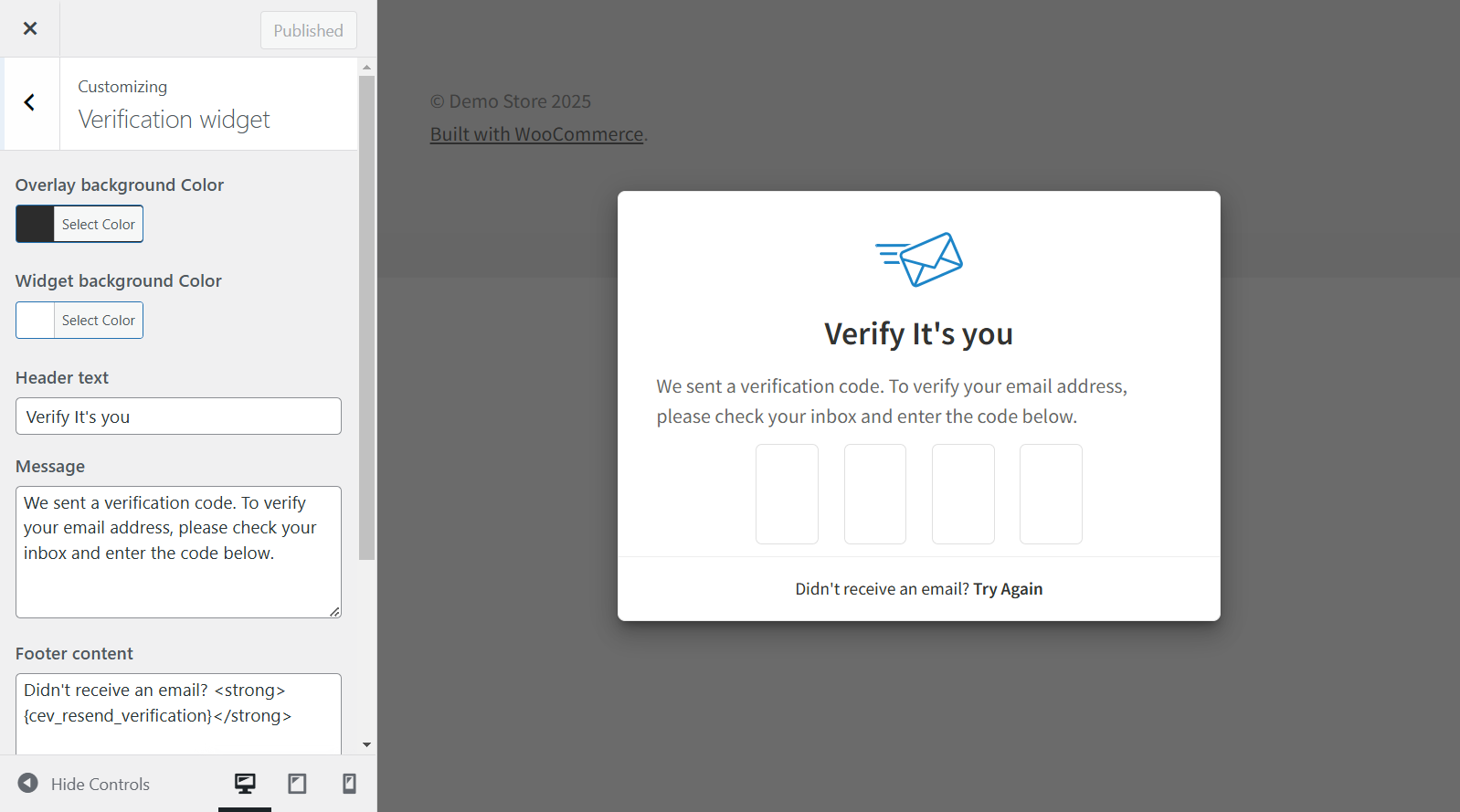
- Customizable verification popup — Modify the popup’s design, colors, and messages to match your store’s branding using the built-in live preview customizer.
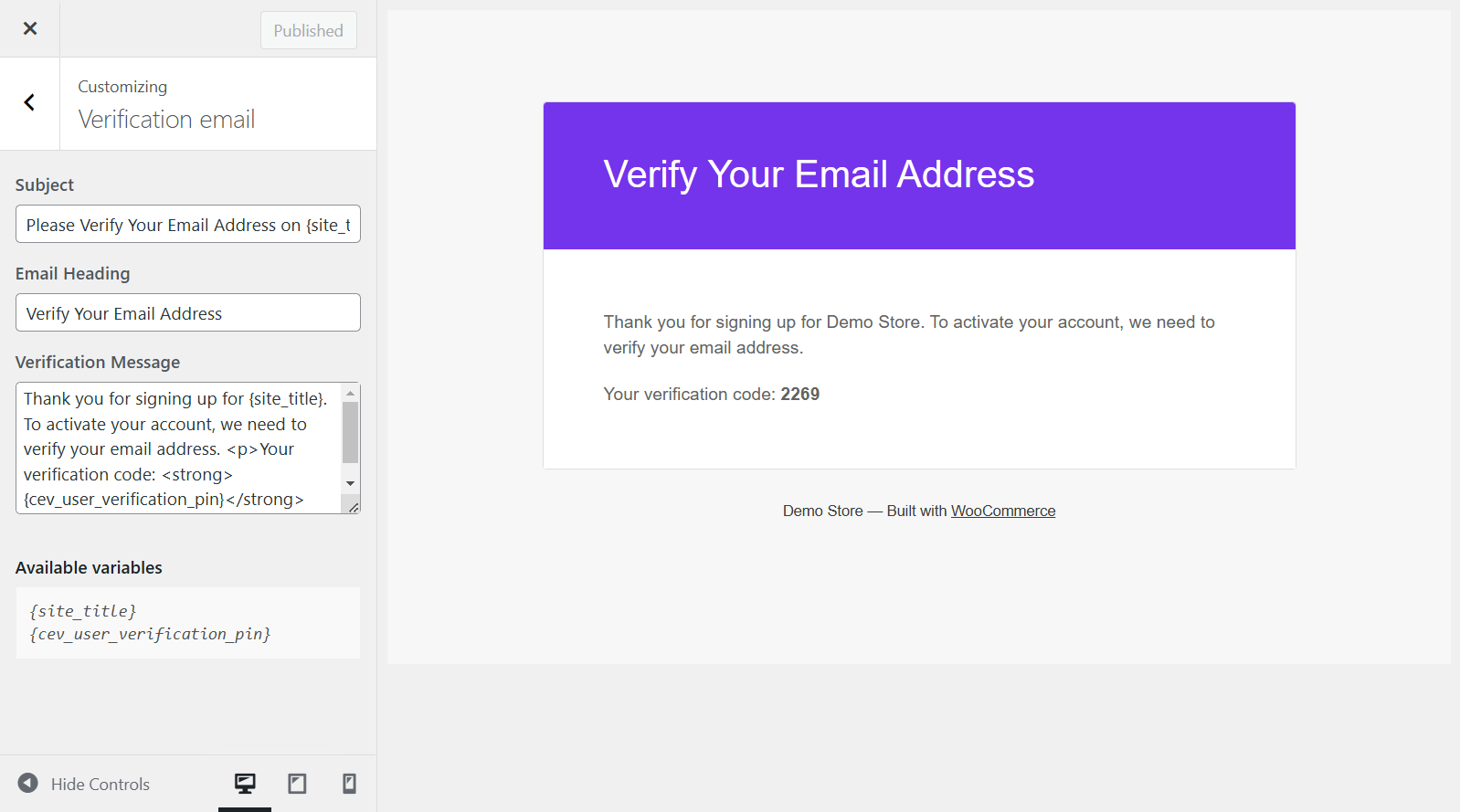
- Customizable verification email — Edit the OTP email subject, heading, and message content to match your brand voice.
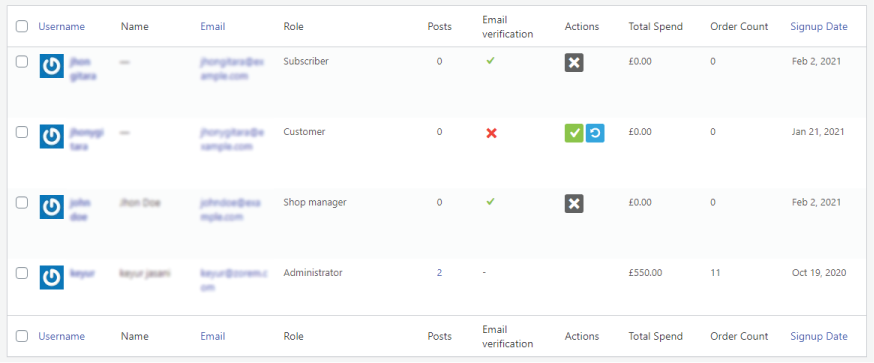
- Admin verification management — View and manage email verification statuses for all users from the WordPress Users admin panel. Manually verify or re-send verification emails in bulk.
- Role-based verification skipping — Exclude specific user roles (e.g. administrators, shop managers) from the verification requirement.
- Redirect after verification — Send customers to any page of your choice after successful email verification.
- HPOS Compatible — Fully compatible with WooCommerce High-Performance Order Storage.
Free vs PRO — What’s the Difference?
CEV Free covers registration verification. CEV PRO adds checkout verification, login authentication, and advanced security controls for stores that need stronger protection.
CEV Free includes:
- OTP email verification at registration
- Verification popup on the registration form
- Resend OTP option
- Customizable popup design and messages
- Customizable verification email template
- Admin verification management panel
- Role-based verification skipping
- Post-verification redirect
- HPOS compatible
CEV PRO adds:
- OTP verification at checkout — Require guest users to verify their email before completing a purchase, blocking fake orders at checkout.
- Cart page verification — Optionally trigger email verification from the cart page, before the customer even reaches checkout.
- OTP length control — Choose between 4-digit and 6-digit OTP codes.
- OTP expiration time — Set how long OTP codes remain valid (e.g. 15 minutes, 72 hours) to balance security and convenience.
- Resend attempt limit — Cap the number of OTP resend requests per session to prevent abuse.
- Login authentication (2FA) — Require OTP verification when a customer logs in from an unrecognized device or browser, adding a second factor to your WooCommerce login.
- New device/location detection — Define what counts as an unrecognized login — new device, new browser, new location, or after a set period of inactivity.
- Advanced email and popup customization — Additional control over OTP email templates and verification popup styling.
- Priority support — Faster, dedicated assistance from the Zorem team.
Compatible With
Customer Email Verification is built to work smoothly with plugins that follow WooCommerce’s standard registration and checkout templates. The following plugins have been tested and confirmed compatible:
- Checkout builders — Checkout WC, WooCommerce Checkout & Funnel Builder by CartFlows
- Social login — WooCommerce Social Login, Nextend Social Login and Register
- Memberships — WooCommerce Memberships
- Affiliates — Affiliate For WooCommerce
- Store management — Smart Manager, Cashier
- Multilingual — WPML
Documentation & Support
More Plugins by Zorem
- Advanced Shipment Tracking for WooCommerce — The #1 WooCommerce shipment tracking plugin. Trusted by 80,000+ stores.
- SMS for WooCommerce — Automated SMS order and shipping notifications via Twilio, WhatsApp, and 18 other providers.
- Local Pickup PRO — Advanced local pickup with multiple locations, appointment scheduling, and ready-for-pickup notifications.
- Country Based Restrictions PRO — Restrict products and payment gateways by customer country using WooCommerce geolocation.
- Zorem Returns — Self-service returns, exchanges, and store credit management for WooCommerce.
Explore the full catalog at zorem.com
Screenshots


Installation
- Go to Plugins > Add New in your WordPress admin and search for “Customer Email Verification for WooCommerce”.
- Click Install Now, then Activate.
- Go to WooCommerce > Email Verification to configure the verification settings, customize the popup and email, and set any role exclusions.
- Test the flow by visiting your registration page — the verification popup should appear after entering an email address.
Alternatively, upload the customer-email-verification-for-woocommerce folder to /wp-content/plugins/ and activate through the Plugins menu.
FAQ
-
How does the OTP verification work?
-
When a customer enters their email on the WooCommerce registration form and submits, a verification popup appears and a one-time OTP code is sent to their email address. The customer enters the code in the popup. If it matches, their account is created. If they close the popup or enter the wrong code, no account is created. This ensures every registered account has a valid, accessible email address.
-
What happens if a customer doesn’t receive the OTP email?
-
The plugin includes a “Resend OTP” option in the verification popup. The customer can click to request a new code. Make sure your WooCommerce store has a reliable transactional email setup (SMTP plugin recommended) to ensure OTP emails are delivered.
-
Can I customize the look of the verification popup?
-
Yes. The plugin includes a built-in live preview customizer where you can change the popup colors, text, and messages without writing any code.
-
Can I customize the OTP email that gets sent to customers?
-
Yes. The OTP email subject line, heading, and body content are all editable from the plugin settings. The email is sent via WooCommerce’s email system, so it inherits your store’s email branding (header, logo, footer).
-
Can I skip verification for administrators or shop managers?
-
Yes. The role-based skipping feature lets you exclude any user role from the email verification requirement. Administrators, shop managers, and any custom roles can be excluded.
-
Can I verify guest checkout customers (not just registered users)?
-
Guest checkout OTP verification — requiring email verification before a guest can complete a purchase — is available in CEV PRO.
-
Can I require OTP verification at login (2FA)?
-
Login authentication with OTP verification for unrecognized devices or browsers is available in CEV PRO.
-
Yes. CEV is compatible with WooCommerce Social Login and Nextend Social Login and Register. See the full compatibility list for details.
-
Is CEV compatible with HPOS (High-Performance Order Storage)?
-
Yes. Customer Email Verification is fully compatible with WooCommerce High-Performance Order Storage (custom order tables).
-
Does CEV work with WPML for multilingual stores?
-
Yes. CEV has been tested with WPML and the plugin strings are translatable.
-
Can I bulk-verify users or resend verification emails in bulk?
-
Yes. From the WordPress Users admin panel, you can select multiple users and use the bulk actions to manually verify their email addresses or resend verification emails.
Reviews


Contributors & Developers
“Customer Email Verification for WooCommerce” is open source software. The following people have contributed to this plugin.
Contributors


“Customer Email Verification for WooCommerce” has been translated into 1 locale. Thank you to the translators for their contributions.
Translate “Customer Email Verification for WooCommerce” into your language.
Interested in development?
Browse the code, check out the SVN repository, or subscribe to the development log by RSS.
Changelog
2.8.1
- Fix – Register button on the My Account registration form gave no feedback while the verification request was processing, so repeat clicks sent multiple verification emails and each new email invalidated the code in the previous one.
- Improvement – The Register button is now disabled and shows a “Please wait” loader while the verification request runs, and duplicate requests are blocked on both the front end and the server.
- Dev – Tested with WooCommerce 11.1.0 and WordPress 7.1.
2.8
- Fix – Undefined variable $expire_time.
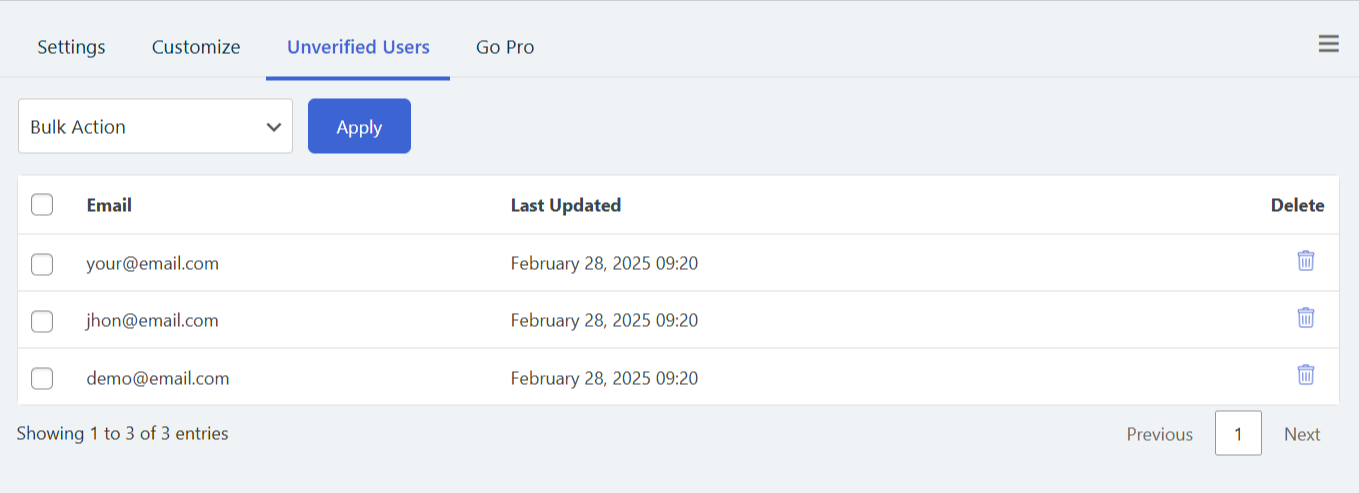
- Improvement – Redesigned the entire admin experience with the new Zorem UI design system (ZUI).
- Dev – Tested with WooCommerce 10.9.1 and WordPress 7.0.
2.7
- Dev – Tested with WooCommerce 10.7.0 and WordPress 6.9.4.
2.6.9
- Fix – Fixed admin notice dismiss functionality not working when clicking the dismiss button or X icon. The notice now properly dismisses and redirects to a clean URL.
- Fix – Resolved issue where WordPress converts dots to underscores in query parameters, preventing the dismiss handler from detecting the parameter correctly.
2.6.8
- Enhancement – Added PRO upsell elements (locked PRO fields, upgrade banner, Go PRO tab with comparison and benefits).
- Dev – Tested with WooCommerce 10.5.1 and WordPress 6.9.1.
2.6.7
- Fix – Resolved issue where users were redirected to /my-account/email-verification/ (404) instead of seeing the verification popup on new installations.
- Dev – Tested with WooCommerce 10.4.2 and WordPress 6.9.
2.6.6
- Fix – Updated deprecated WooCommerce script handles (jquery-blockui, jquery-tiptip, serializejson) to new handles (wc-jquery-blockui, wc-jquery-tiptip, wc-serializejson) for compatibility with WooCommerce 10.3+.
- Fix – User verification filter on users page.
- Dev – Tested with WooCommerce 10.3.3 and WordPress 6.8.3.
2.6.5
- Dev – Tested with WooCommerce 10.1.2.
2.6.4
- Fix – JavaScript link for “Already Have a Verification Code?” not working.
- Fix – Tooltip not working with WooCommerce 10.
- Dev – Tested with WooCommerce 10.0.4 and WordPress 6.8.2.
2.6.3
- Fix – PHP Warning: Undefined array key.
- Fix – Grammar in Verification Page — changed “4-digits code” to “4-digit code”.
- Fix – Verification widget not opening in customizer.
- Dev – Tested with WooCommerce 9.9.5.
2.6.2
- Dev – Tested with WooCommerce 9.8.5 and WordPress 6.8.1.
2.6.1
- Fix – Function _load_textdomain_just_in_time was called incorrectly.
- Dev – Tested with WooCommerce 9.8.1 and WordPress 6.8.
2.6
- Dev – Updated the promotional notice on the settings page.
- Dev – Tested with WooCommerce 9.7.1.
2.5
- Fix – Resolved a fatal error where the class “cev_new_account_email_customizer” was not found.
- Enhancement – Removed all console.log statements from JavaScript files to improve performance.
- Fix – Resolved the passcode verification issue by ensuring the user table is created properly during the plugin update process.
- Dev – Tested with WooCommerce 9.7.0.
2.4
- Fix – Signup email verification issue: verification code doesn’t match.
2.3
- Dev – Created new signup verification flow where users cannot create an account without verifying their email.
- Dev – Updated admin page design to match the new signup verification flow.
- Dev – Updated customizer to match the new signup verification flow.
- Dev – Tested with WooCommerce 9.6.2 and WordPress 6.7.2.
2.2
- Fix – Uncaught TypeError: Cannot read properties of undefined (reading ‘top’).
- Fix – PHP Notice: Function _load_textdomain_just_in_time was called incorrectly.
- Fix – Deprecated: explode(): Passing null to parameter.
- Dev – Tested with WooCommerce 9.5.1 and WordPress 6.7.1.
2.1
- Enhancement – Tested with WPML 4.7 and updated the documentation.
- Dev – Tested with WooCommerce 9.4.2 and WordPress 6.7.
2.0
- Enhancement – Added UTM links for all external links to zorem.com.
- Enhancement – Added text domain to all strings in customizer.
- Dev – Tested with WooCommerce 8.9.1 and WordPress 6.5.3.
1.8
- Fix – Broken HTML on Users page.
- Fix – User approval function on backend not working.
- Dev – Tested with WooCommerce 8.5.1.
1.7
- Enhancement – Improved design of PRO banner.
- Dev – Compatibility with PHP 8.2.
- Dev – Tested with WooCommerce 8.3.0 and WordPress 6.4.1.
1.6
- Dev – Tested with WooCommerce 6.9.4 and WordPress 6.0.2.
- Dev – Added compatibility with WooCommerce HPOS.
1.5
- Dev – Tested with WooCommerce 6.9.4 and WordPress 6.0.2.
- Dev – Tested with WooCommerce Multilingual 5.0.0 Beta.
- Enhancement – Updated the settings page design.
1.4.1
- Fix – “Try Again” link in email verification popup.
1.4
- Enhancement – Updated design of settings page.
- Enhancement – Updated design of Go PRO page.
- Dev – Improved code security.
- Dev – Tested with WooCommerce 5.5.2 and WordPress 5.8.
1.3.9
- Enhancement – Tested WooCommerce customer email verification compatibility.
- Dev – Tested with WooCommerce 5.4.1 and WordPress 5.7.2.
1.3.8
- Fix – PHP Fatal error: Call to undefined function wc_cev_customizer().
1.3.7
- Fix – Uncaught Error: Class ‘cev_initialise_customizer_settings’ not found.
1.3.6
- Enhancement – Updated settings page design.
- Enhancement – Added AJAX on Email Verification and Actions panel on users listing page.
- Dev – Tested with WooCommerce 5.2.1 and WordPress 5.7.1.
1.3.5
- Enhancement – Improved the “Email Verification” link HTML in user verification email.
- Dev – Tested with WooCommerce 5.0.0 and WordPress 5.6.
1.3.4
- Fix – Verification widget always showing for administrator users on My Account page.
- Fix – Skip email verification for selected user roles option not working correctly.
- Dev – Tested with WooCommerce 4.9.2 and WordPress 5.6.
1.3.3
- Enhancement – Set up My Account change email verification text.
- Enhancement – Customizer improvements.
- Dev – Tested with WooCommerce 4.9.2 and WordPress 5.6.
1.3.2
- Enhancement – Updated settings page design.
- Enhancement – Added new customizer for verification display on the new account email.
- Enhancement – Added new customizer for verification widget style and message.
- Enhancement – Removed customer view settings page tab.
- Dev – Tested with WooCommerce 4.9.1 and WordPress 5.6.
1.3.1
- Enhancement – Updated settings page design.
- Enhancement – Updated users list page design for Email Verification and actions panel.
- Enhancement – Updated edit user page design for Email Verification panel.
- Enhancement – Added functionality of live preview of verification widget.
- Enhancement – Added verification success message in general settings.
- Dev – Tested with WooCommerce 4.8 and WordPress 5.6.
1.3
- Enhancement – Added option for “Redirect to selected page after verification”.
- Dev – Tested with WooCommerce 4.5.
1.2
- Fix – Fixed ERR_TOO_MANY_REDIRECTS issue in email verification page.
- Dev – Tested with WordPress 5.5.
1.1
- Enhancement – Merged verification status fields in WordPress users admin and added action icons.
- Enhancement – Added bulk actions to resend verification email and verify user email addresses.
- Fix – Auto-refresh the permalink.
1.0.9
- Enhancement – Added filter in Users list page for verified and non-verified users.
- Enhancement – Added option “Allow first login after registration without email verification”.
- Fix – Fixed warnings: Undefined offset: 0 in class-wc-customer-email-verification-admin.php.
1.0.8
- Enhancement – Changed navigation label.
- Fix – Settings page design issue.
- Fix – User page layout issue.
- Fix – Undefined index 0 warnings.
1.0.7
- Dev – Added functionality to skip email verification for already-registered users.
1.0.6
- Enhancement – Updated design of OTP input box in email verification form.
- Enhancement – Updated design of email verification form.
- Dev – Changed default values for email heading and content.
1.0.5
- Fix – Separate email subject issue.
- Fix – WooCommerce email verification endpoint not found issue.
1.0.4
- Enhancement – Added Enable/Disable option for customer email verification.
- Enhancement – Added spinner and settings save message in settings page.
- Fix – Fixed warnings in frontend page.
1.0.3
- Dev – Updated email verification process and added OTP verification functionality.
- Dev – After login, block all My Account pages until user verifies their email.
1.0.2
- Dev – Tested with WooCommerce 4.0 and WordPress 5.4.
1.0.1
- Fix – WooCommerce email issue.
- Fix – Skip email verification for selected roles option save issue.
- Fix – Warnings from users list page.
1.0
- Initial version.