

Description
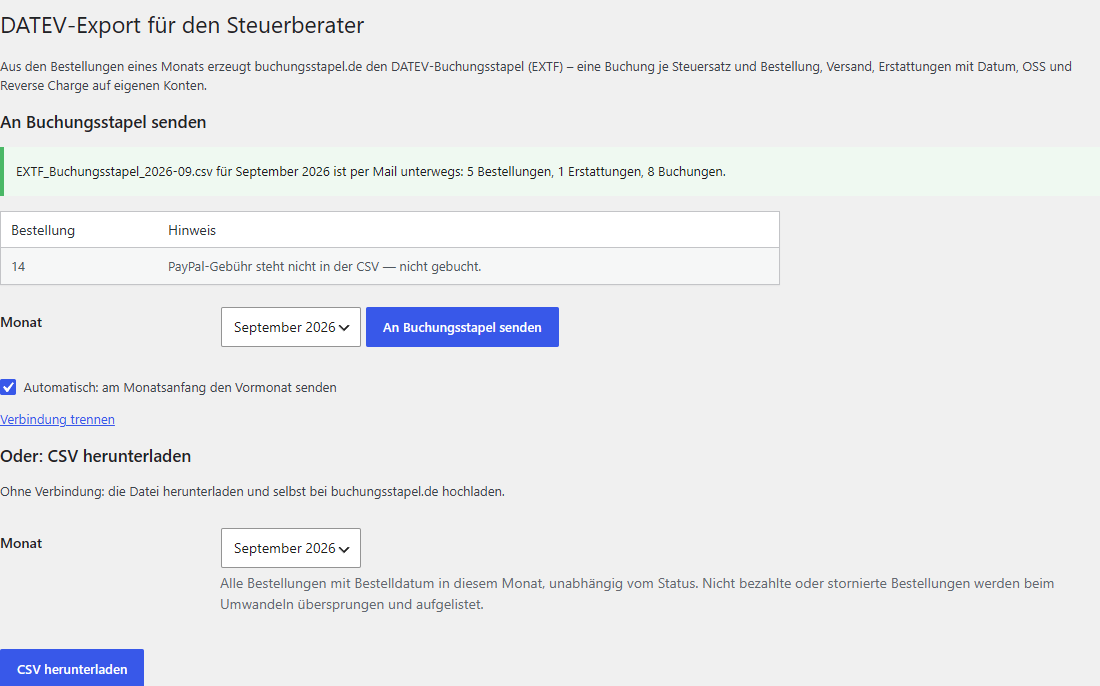
WooCommerce has no order export for bookkeeping. This plugin adds a page under WooCommerce DATEV-Export where you pick a month and either send its orders to buchungsstapel.de with one click, or download them as one CSV file: one row per order with net amounts and tax per line item, shipping, fees, and refunds with their dates.
Direct sending (new in 1.1): paste the upload link of your client at buchungsstapel.de once, then click An Buchungsstapel senden — or switch on automatic sending, which sends the previous month at the start of each month. The DATEV file arrives by email at the buchungsstapel.de account (you or your tax advisor).
The external service buchungsstapel.de produces the DATEV posting batch (an EXTF file) that a German tax advisor imports directly into DATEV Rechnungswesen:
- one posting per tax rate and order (19 %, 7 %, export, EU B2B reverse charge, OSS with destination country and rate)
- shipping follows the goods, gift card sales are booked as liabilities, refunds carry their real date
- clearing accounts per payment method (PayPal, other), SKR03 or SKR04
- a preview with totals per account and every caveat before the file goes to the accountant
The plugin’s admin page is written in German, because DATEV bookkeeping is a German-market topic.
What the plugin does not do
- It sends nothing until you connect it. After that it sends only when you click An Buchungsstapel senden or switch on automatic sending. The CSV download never sends anything.
- It does not post anything and does not replace a tax advisor.
- Payment fees (PayPal, Stripe) and the customer’s VAT ID are not part of WooCommerce orders and therefore not in the file.
External service
This plugin connects to buchungsstapel.de (Universal Exporters LLC), the service that converts the orders into a DATEV posting batch. The service is paid (monthly subscription, 14-day free trial); the CSV download works without it and opens in any spreadsheet.
What is sent, and when: only after you paste an upload link, and only when you click An Buchungsstapel senden or have automatic sending switched on (once a month, previous month). The plugin then sends that month’s orders over HTTPS to https://buchungsstapel.de/api/v1/upload/ — order number, dates, status, amounts and tax per line item, shipping, fees, refunds, payment method, billing/shipping name, company and country. Customer email addresses are not sent. The request carries the version numbers of the plugin, WordPress, WooCommerce and PHP (for support), not the site address. buchungsstapel.de processes the orders in memory, emails the DATEV file to the account holder and does not store the orders. Service privacy policy and terms: buchungsstapel.de/privacy, buchungsstapel.de/terms.
Trademarks
Buchungsstapel and buchungsstapel.de are operated by Universal Exporters LLC, the author of this plugin. DATEV is a registered trademark of DATEV eG, Nuremberg. WooCommerce is a trademark of Automattic Inc. This plugin is an independent product and is not affiliated with, endorsed by or sponsored by DATEV eG or Automattic.
Screenshots
Installation
- Install and activate the plugin (WooCommerce must be active).
- Open WooCommerce DATEV-Export.
- Direct: paste the upload link from your buchungsstapel.de account (client Upload-Link), choose a month, click An Buchungsstapel senden. Optionally tick automatic sending.
- Or: click CSV herunterladen and upload the file at buchungsstapel.de yourself.
The plugin stores only the upload link and the automatic-sending switch (two options, no tables). Deleting the plugin removes them.
FAQ
-
Which orders are in the file?
-
All orders whose order date falls in the chosen month, regardless of status. During conversion only paid orders (status Processing, Completed, Refunded) are posted; all others are listed and skipped.
-
Does it work with HPOS (High-Performance Order Storage)?
-
Yes. The plugin reads orders exclusively through
wc_get_orders()and declares HPOS compatibility. -
Do I need this plugin if I already have an export plugin?
-
No. buchungsstapel.de also reads the CSV written by “Order Export & Order Import for WooCommerce” (WebToffee). This plugin saves configuring an export profile and always includes every required column.
-
Is the plugin free?
-
Yes, GPL. The buchungsstapel.de service is a subscription with a 14-day trial; the plugin commits you to nothing.
-
Where do I see what will be posted?
-
On buchungsstapel.de, as a preview with totals per account before the export. The posting logic is documented at buchungsstapel.de/wissen/woocommerce-datev-export (German).
-
Something is wrong in my export. Where do I report it?
-
In this plugin’s support forum, in German or English. Tell us the month and what looks wrong; an order number helps. Please don’t post customer data.
Buchungsstapel is a small product with short lines of communication. Requests and suggestions from everyday use go straight into the next version.
Reviews
There are no reviews for this plugin.
Contributors & Developers
“Buchungsstapel Order Export for WooCommerce” is open source software. The following people have contributed to this plugin.
Contributors
Translate “Buchungsstapel Order Export for WooCommerce” into your language.
Interested in development?
Browse the code, check out the SVN repository, or subscribe to the development log by RSS.
Changelog
1.1.1
- If automatic sending fails, the site admin gets one email per month; the plugin keeps retrying daily.
- Error messages have a “Problem melden” link that opens an email to support with the versions and the error (no order data).
- Months without orders count as done for automatic sending.
1.1.0
- Send a month directly to buchungsstapel.de with one click, using the client’s upload link.
- Optional automatic sending of the previous month at the start of each month.
- Customer email addresses are left out of what is sent.
1.0.0
- First release: monthly order export as CSV in the format buchungsstapel.de reads.