

Description
The EU Cyber Resilience Act (CRA) and the NIS2 directive expect the businesses
they cover to know what software they run, monitor it for known
vulnerabilities, patch without delay – and to be able to prove all of that.
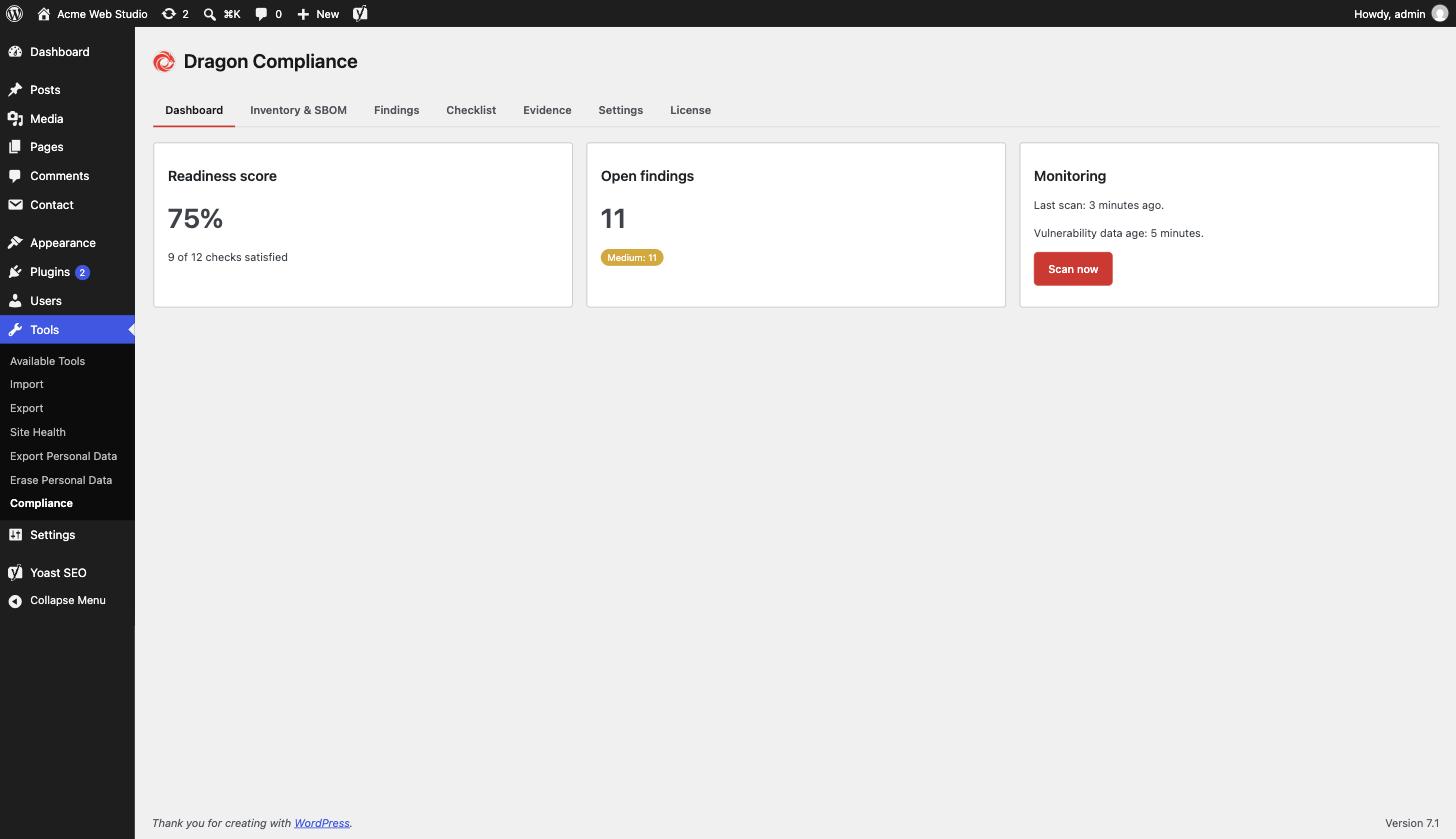
Dragon Compliance turns your WordPress site into something you can hand to an
auditor:
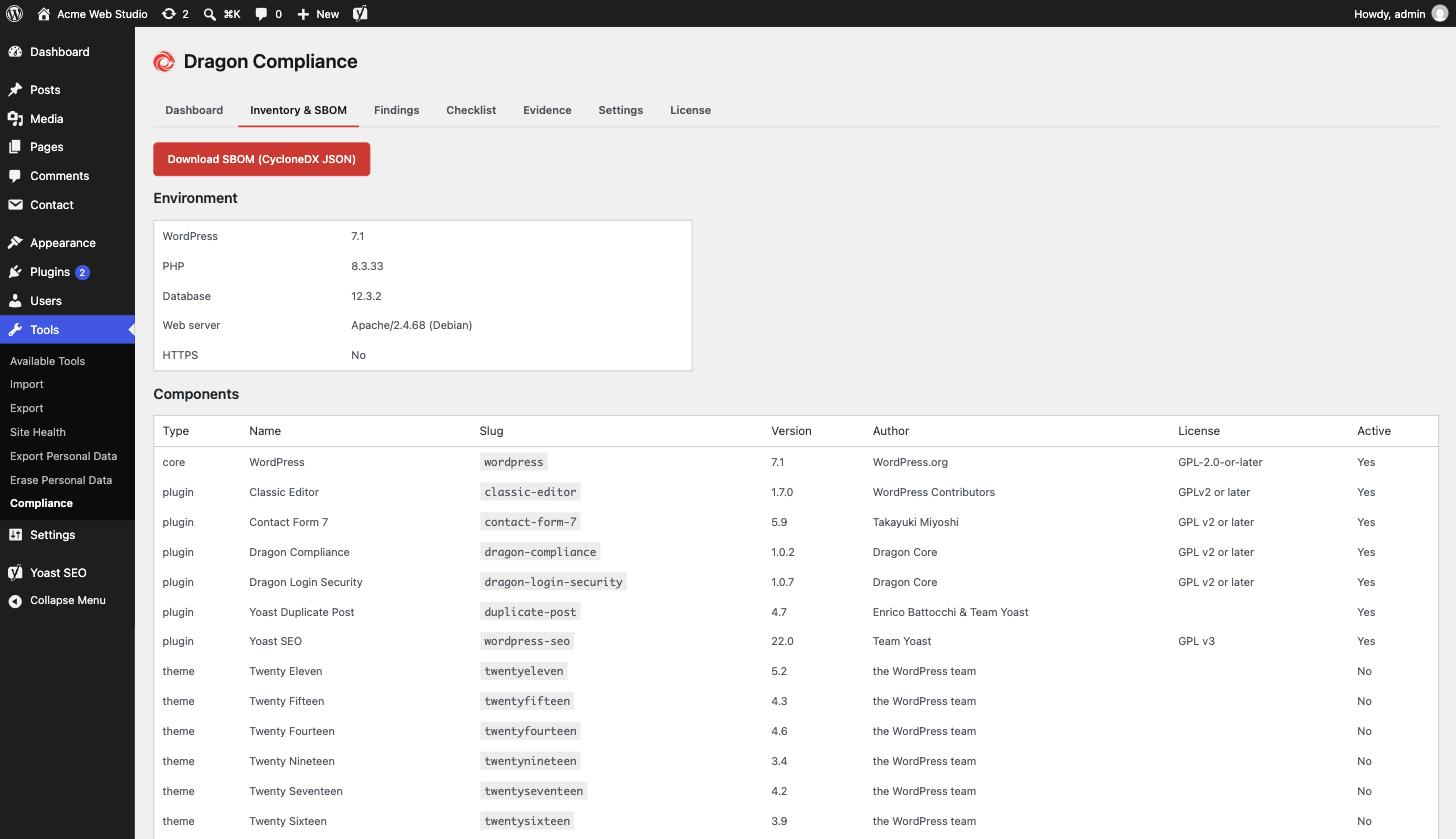
- Software inventory – WordPress core, every plugin and theme with version,
author and license, plus the PHP/database/server environment. - SBOM export – download a standards-compliant CycloneDX 1.6 JSON Software
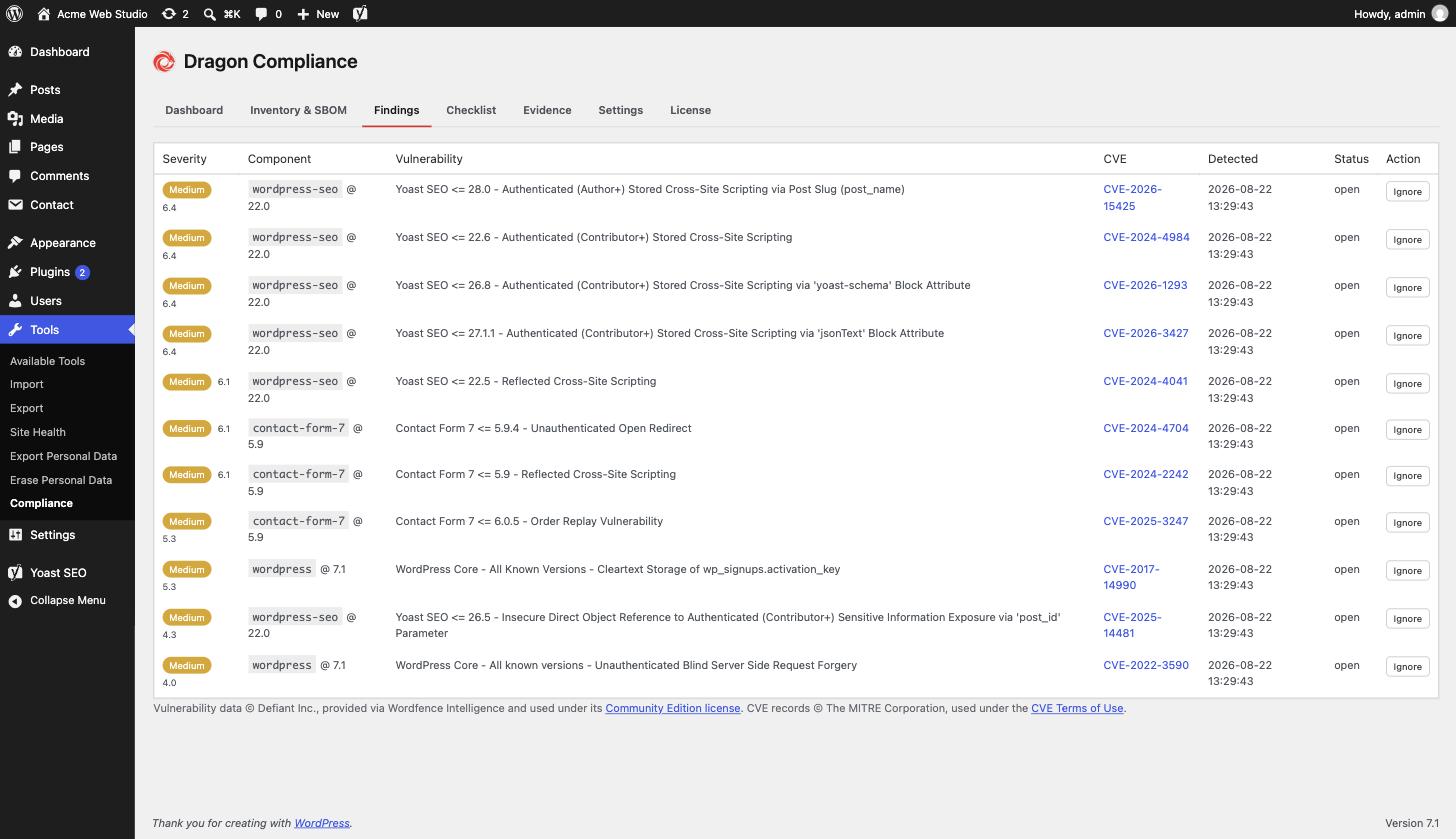
Bill of Materials, the artifact auditors and enterprise customers ask for. - Vulnerability monitoring that works out of the box – a daily scan checks
WordPress core and every installed plugin and theme against the free
WPVulnerability database, with no account or API key, and lists affected
components by severity with CVE links. A component that could not be checked
is shown as “not checked”, never as clear. If you prefer, switch to the
Wordfence Intelligence feed with your own free token. - Vulnerability alerts – new critical findings, and new findings whose
severity has not been published yet, are emailed to the site admin or to a
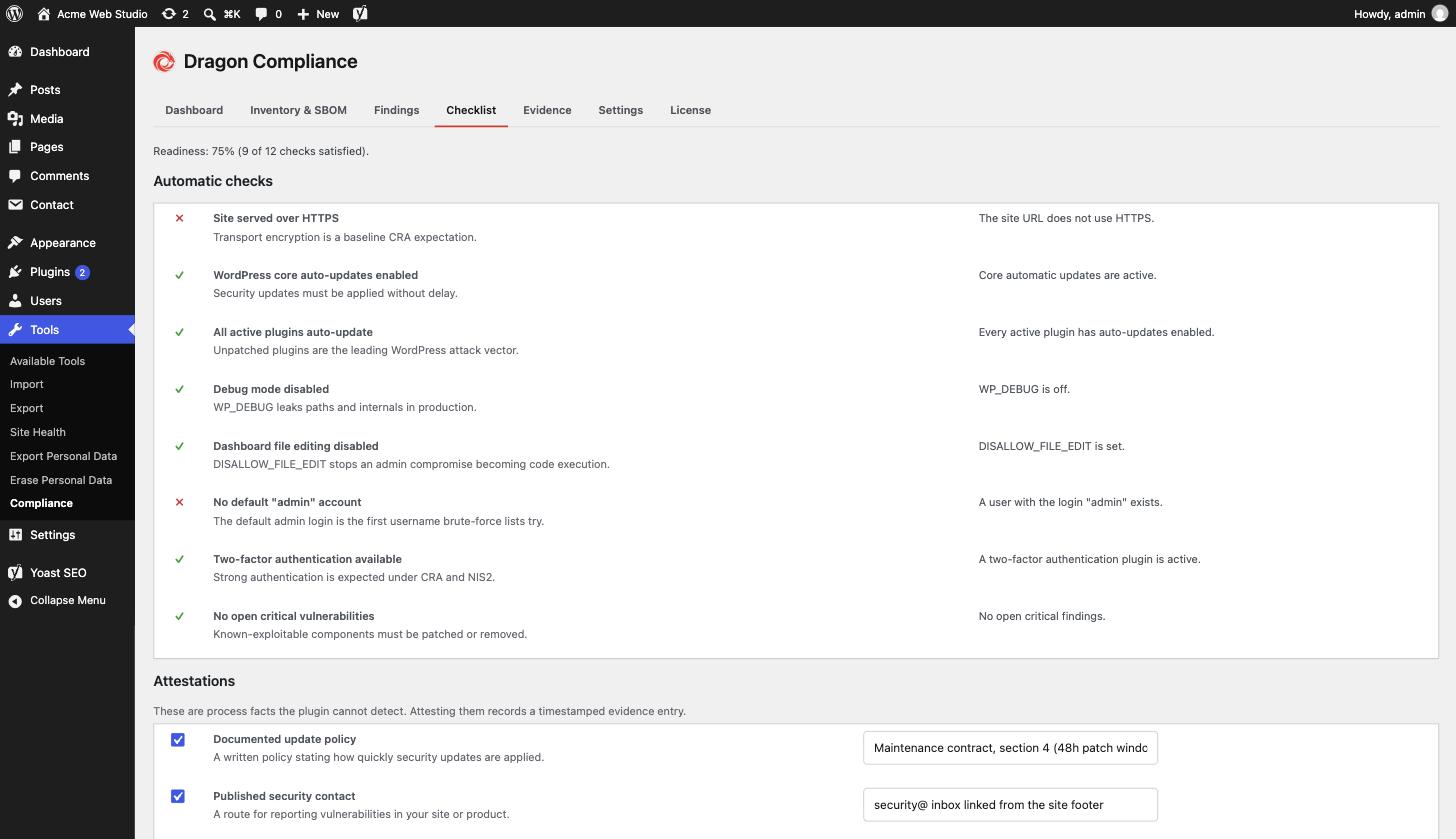
list of addresses you choose. - CRA readiness checklist – automatic checks (HTTPS, auto-updates coverage,
debug mode, file editing, 2FA, default admin account, open criticals) plus
manual attestations for process facts like your update policy and backups,
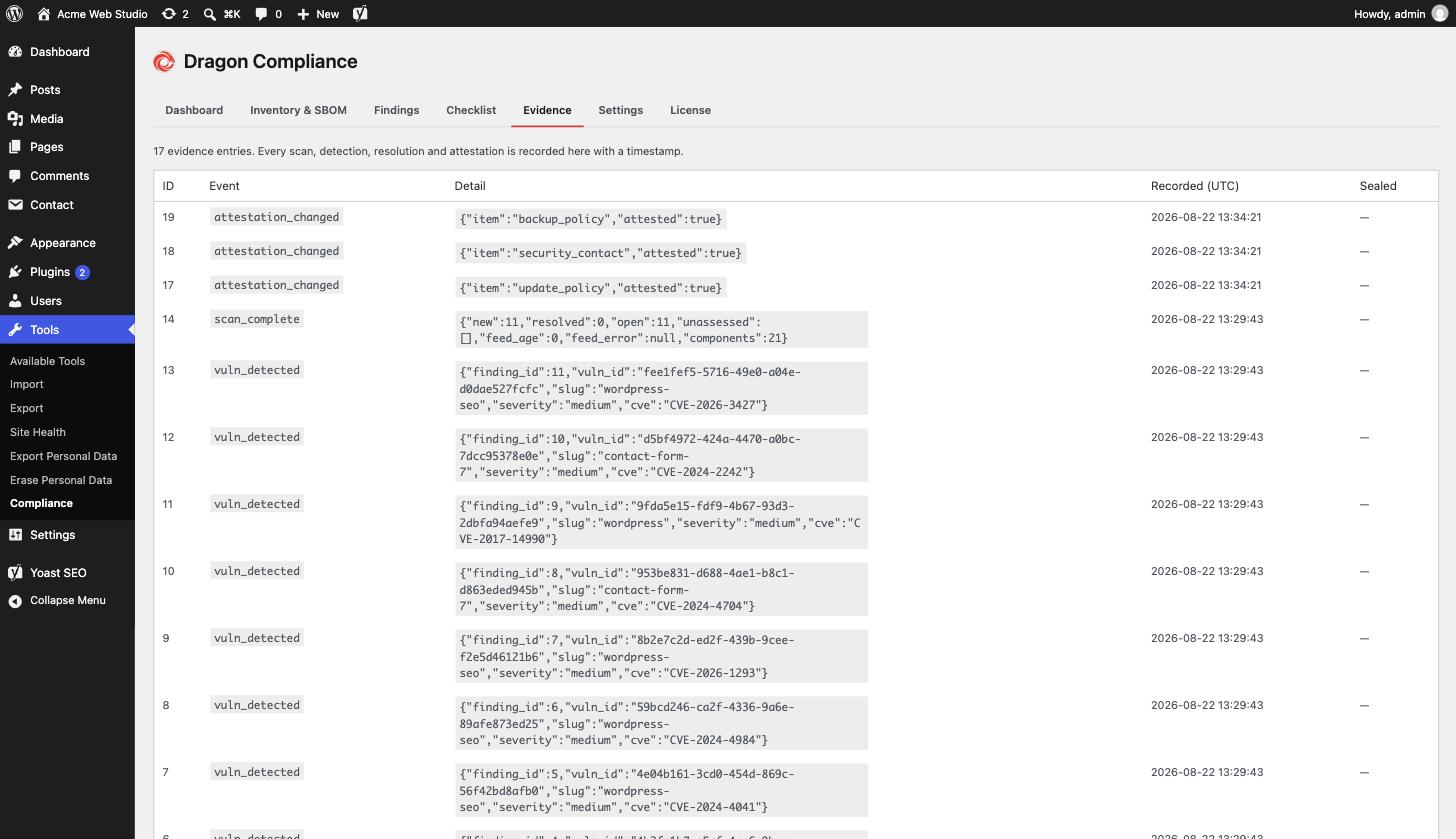
with a completion score. - Evidence log – every scan, detection, resolution and attestation change
is recorded with a timestamp, building the audit trail regulators expect.
Matching, findings and the evidence log all stay in your WordPress database.
To check for known vulnerabilities, the plugin asks a public vulnerability
database about your installed components (see External services below): it
sends component names and the WordPress version, never your site address,
users or content.
Everything above is free, fully functional and unlimited.
External services
This plugin connects to one vulnerability database at a time, chosen under
Tools Compliance Settings. Both are used only for vulnerability
monitoring: once a day, after you add, update or remove a plugin or theme,
when you press “Scan now”, and once more shortly after a scan that ran out of
time before every component was looked up.
WPVulnerability (default)
WPVulnerability (https://www.wpvulnerability.com) is a free, public database
of known WordPress vulnerabilities. By default the plugin asks
www.wpvulnerability.net about each installed component: the slug (folder
name) of every plugin and theme, and the WordPress core version number. Plugin
and theme versions are not sent; the plugin compares versions on your server.
Your site address, users and content are not sent; like any web request, the
service sees your server’s IP address. Answers are cached on your site for
12 hours. No account or API key is needed.
WPVulnerability data is published under CC0 1.0.
WPVulnerability privacy policy: https://www.wpvulnerability.com/privacy/
WPVulnerability licence: https://www.wpvulnerability.com/license/
Wordfence Intelligence (only when you choose it)
If you select Wordfence Intelligence and enter your own API token, the plugin
instead downloads the full Wordfence Intelligence vulnerability list from
www.wordfence.com (a service by Defiant Inc.) and matches it on your server.
Only your API token is sent with that request – no data about your site, its
inventory or its users. Without a token nothing is sent to Wordfence. You need
a free wordfence.com account to generate a token.
Wordfence terms of service: https://www.wordfence.com/terms-of-use/
Wordfence privacy policy: https://www.wordfence.com/privacy-policy/
Credits
The WordPress.org listing icon is drawn with glyphs from Lucide (https://lucide.dev), ISC License. Copyright (c) for portions of Lucide are held by Cole Bemis 2013-2022 as part of Feather (https://feathericons.com, MIT License). All other copyright (c) for Lucide are held by Lucide Contributors 2022. The plugin itself does not include these icons.
Screenshots
Installation
- Upload the plugin files to
/wp-content/plugins/dragon-compliance, or install through the WordPress plugins screen. - Activate the plugin through the ‘Plugins’ screen.
- Go to Tools Compliance. Vulnerability monitoring is already on; press “Scan now” for a first result, or wait for the daily scan.
- (Optional) Under Settings, add more alert recipients, or switch the data source to Wordfence Intelligence with your own free API token.
FAQ
-
Does the CRA apply to my site?
-
Not necessarily. The CRA covers products with digital elements placed on the
EU market, and NIS2 covers organisations in certain sectors above certain
sizes; many websites fall under neither. Whether either applies to your
business is a legal question. This plugin gives you the technical evidence
base either way – it is not legal advice. -
Where does the vulnerability data come from?
-
By default from WPVulnerability, a free public database, without an account.
The plugin sends it the slugs of your installed plugins and themes and your
WordPress version, and compares the answers with your installed versions on
your server. You can switch to the Wordfence Intelligence Community Edition
feed with your own free token, in which case the whole feed is downloaded and
nothing about your site is sent. -
What happens if a lookup fails?
-
That component is listed as “not checked” on the Dashboard, Findings and
Inventory tabs and in the evidence log, and its open findings stay open. It is
never reported as free of vulnerabilities. The next scan tries again.A plugin or theme whose folder name cannot be a WordPress.org slug (for
example one with a space, a plus sign or brackets in it), one WPVulnerability
does not accept as a slug, and a custom single-file plugin (a lone .php file
in the plugins folder) are not failures: they are shown as “Checked – not in
the database”. A pre-release of WordPress (a beta or release candidate) is
checked against the release it leads up to. -
Which findings are emailed?
-
New critical findings, and new findings whose severity the data source has not
published yet. The email lists the critical ones first, then the others, each
marked “severity not published – review it”. Findings of high, medium or low
severity are shown on the Findings tab but not emailed. -
What does the “No open critical vulnerabilities” check count?
-
Only open findings with a published critical severity. A finding whose
severity has not been published does not make the check fail, so review those
on the Findings tab. The check also fails while any component could not be
checked. -
What happens when I switch the data source?
-
At the next scan, findings from the old source get the status “Closed: data
source changed”, never “Resolved”, and the new source’s findings are recorded.
An issue both sources report (same component and CVE) is not alerted again,
and stays ignored if you had ignored it. The switch is recorded in the
evidence log. A site updated from an earlier version that had vulnerability
data but no saved Wordfence token moves to WPVulnerability, and that switch
is recorded the same way. -
Who receives alerts?
-
The site admin email by default. Under Settings you can enter several
addresses, one per line or separated by commas; each gets its own email. -
What SBOM formats are supported?
-
CycloneDX 1.6 JSON.
-
What is an SBOM, and why would I need one?
-
A Software Bill of Materials lists every software component you run, with versions and licenses – like an ingredients label for your site. Auditors, enterprise customers and EU regulation increasingly ask for one. This plugin exports yours in the standard CycloneDX format in one click.
-
When do the CRA obligations apply?
-
The Cyber Resilience Act’s vulnerability and incident reporting obligations have applied since 11 September 2026, and the remaining requirements apply from 11 December 2027. If the CRA touches your business, the evidence trail is worth keeping from now on – findings and attestations only prove a history if they have one.
-
Will it slow down my site?
-
No. Scans run in the background once a day via WP-Cron, there is no front-end code at all, and vulnerability answers are cached for 12 hours.
-
Is this a malware scanner?
-
No. It matches your installed software versions against a database of
publicly known vulnerabilities. It does not scan files for infections.
Reviews
There are no reviews for this plugin.
Contributors & Developers
“Dragon Compliance – CRA & NIS2 Compliance, SBOM Export & Vulnerability Scanner” is open source software. The following people have contributed to this plugin.
Contributors
Interested in development?
Browse the code, check out the SVN repository, or subscribe to the development log by RSS.
Changelog
1.1.0
- New: vulnerability monitoring works out of the box. WPVulnerability is the default data source, with no account or API key. Each installed plugin and theme is looked up by its slug, and WordPress core by its version; answers are cached for 12 hours.
- New: a component whose lookup fails is listed as “not checked” on the Dashboard, Findings and Inventory tabs and in the evidence log. Its open findings stay open, and the “No open critical vulnerabilities” check does not pass until it is checked.
- New: a plugin or theme whose name cannot be a WordPress.org slug, and a custom single-file plugin, is shown as “Checked – not in the database” instead of “not checked”. A WordPress beta or release candidate is checked against the release it leads up to.
- New: findings whose severity has not been published are emailed too, after the critical ones and marked for review.
- New: switching the data source closes the old source’s findings as “data source changed” instead of fixed. An issue both sources report is not alerted again and keeps its ignored status. A site updated with vulnerability data but no saved Wordfence token moves to WPVulnerability, and that switch is recorded in the evidence log too.
- Changed: a WordPress core issue listed several times under one CVE is shown once, and a copy without a CVE is dropped when its description matches a CVE entry. Copies worded differently can still appear as separate findings.
- New: choose the data source under Settings. Sites that already saved a Wordfence Intelligence token keep Wordfence.
- New: alerts can go to several email addresses (one per line or separated by commas). Leave the field empty to keep emailing the site admin. A list with an invalid address is refused whole, and an alert the mail system refuses is recorded in the evidence log.
- Changed: requests to WPVulnerability and Wordfence identify the plugin instead of carrying the site address in the user agent.
- Changed: the Wordfence feed can only be fetched from www.wordfence.com.
- Removed: the License tab and all add-on prompts.
1.0.13
- Checklist notes and attestations are cleaned as they are read. A malformed submission saves an empty note instead of the word “Array”.
- The plugin inventory reads each plugin’s licence through WordPress’s own plugin list.
- Another plugin that changes the list of plugin headers can no longer hide licences from the inventory or the SBOM.
- Fixed: uninstall deletes data only when the opt-in is clearly on (1, true, yes or on), not for a value set to “false” or “no”.
1.0.12
- Fixed: the daily scan and the scan after a plugin change stopped with an error when run by WP-Cron, so only Scan now worked. Scheduled scans now run.
- Fixed: a custom single-file plugin named like a WordPress.org plugin could be matched to that plugin’s vulnerabilities. Only Hello Dolly is matched by file name.
- Multisite: each site schedules its own scan, reads the network’s auto-update settings and sees network-activated two-factor plugins.
- Deactivating clears both scheduled scans, and uninstall runs per site.
1.0.11
- Fixed: a vulnerability that returns after it was resolved (for example after a plugin downgrade) is reopened and alerted again.
- Single-file plugins such as Hello Dolly are matched against the vulnerability feed.
- Alert text shows vulnerability titles correctly.
1.0.10
- Every screen, email and alert is now translatable, so community translations from translate.wordpress.org cover the whole plugin. Counts use proper plural forms, and numbers and dates follow your site’s language.
- Severity, status and evidence entries show readable labels.
1.0.9
- An “Upgrade to Pro” link on the Plugins screen, a one-line pointer at the foot of the plugin’s own screens, and a single dismissible note once the plugin has done its job. All three disappear when the Pro add-on is active; nothing in the free plugin is locked or changed.
1.0.8
- Fixed: an attestation whose database write failed was still logged as evidence and reported as saved. All four attestations are now stored in a single write that is read back before any evidence is recorded, evidence is recorded only for items that actually changed, and a refused write shows an error instead of “Attestations saved”.
- Fixed: ignoring or reopening a finding recorded a status-change evidence entry even when the row did not change. Evidence is now recorded only when the status actually changed, and a no-op or failed update shows a notice instead of “Finding updated”.
- Fixed: a scan whose “mark resolved” write failed still recorded resolution evidence and fired the resolved hook for every finding. Resolutions that were not stored are no longer reported, and the next scan retries them.
- Fixed: the database schema version was stamped even when a table could not be created, which stopped the plugin from retrying. Each table is now checked to exist before the version is recorded; a failure is retried every 10 minutes and shown to administrators as a notice naming the missing tables.
1.0.7
- Asks for a WordPress.org review once, only on the Compliance screen and only after a vulnerability scan has completed or an SBOM has been exported. “Maybe later” snoozes it for a month and “No thanks” is permanent.
- New
dragoncompliance_sbom_exportedaction fires when an SBOM download is generated. - Listing title, description and tags now say what the plugin does, so it is easier to find in the plugin directory.
1.0.6
- New: the vulnerability feed source can now be supplied by Dragon Compliance Pro, which downloads it from Dragon Core so licensed sites need no Wordfence account. The free plugin only accepts www.wordfence.com or api.dragoncore.ltd as a source – any other host is ignored.
- Improvement: the dashboard and Findings screens now say when monitoring is configured but no vulnerability data has been downloaded yet, and show why the last download failed, instead of looking healthy with nothing checked.
- Hardening: the feed request no longer follows redirects; the Wordfence token is attached to the request after the source is validated and is never exposed to other plugins; an oversized feed record aborts the refresh (keeping the last good data) rather than being read into memory; an empty local index is never revalidated with a conditional request.
- Free users: no change; your Wordfence token keeps working exactly as before.
1.0.5
- Security: the stored Wordfence Intelligence API token now uses authenticated encryption (tamper-detecting), so a modified ciphertext is rejected rather than decrypted.
- New: vulnerability monitoring re-scans immediately when a plugin or theme is installed, updated or removed, instead of waiting for the next daily run – newly added software is checked straight away.
1.0.4
- Expanded the plugin listing: clearer free vs Pro breakdown, fuller FAQ, and a live-preview blueprint.
1.0.3
- Added screenshots of every screen to the plugin listing.
1.0.2
- Compatibility: tested up to WordPress 7.1.
- Housekeeping: corrected the contributor name in the plugin readme.
1.0.1
- Performance: new database index keeps evidence sealing fast as the log grows.
- New: “Delete data on uninstall” checkbox in settings.
- Polish: helpful empty states on the Inventory and Evidence screens; accessibility improvements.
1.0.0
- Initial release: inventory, CycloneDX 1.6 SBOM export, daily vulnerability
monitoring via Wordfence Intelligence, CRA readiness checklist with
attestations, evidence log, critical-finding email alert.