

Description
Most sermon plugins publish a video and a title. A sermon is more than that.
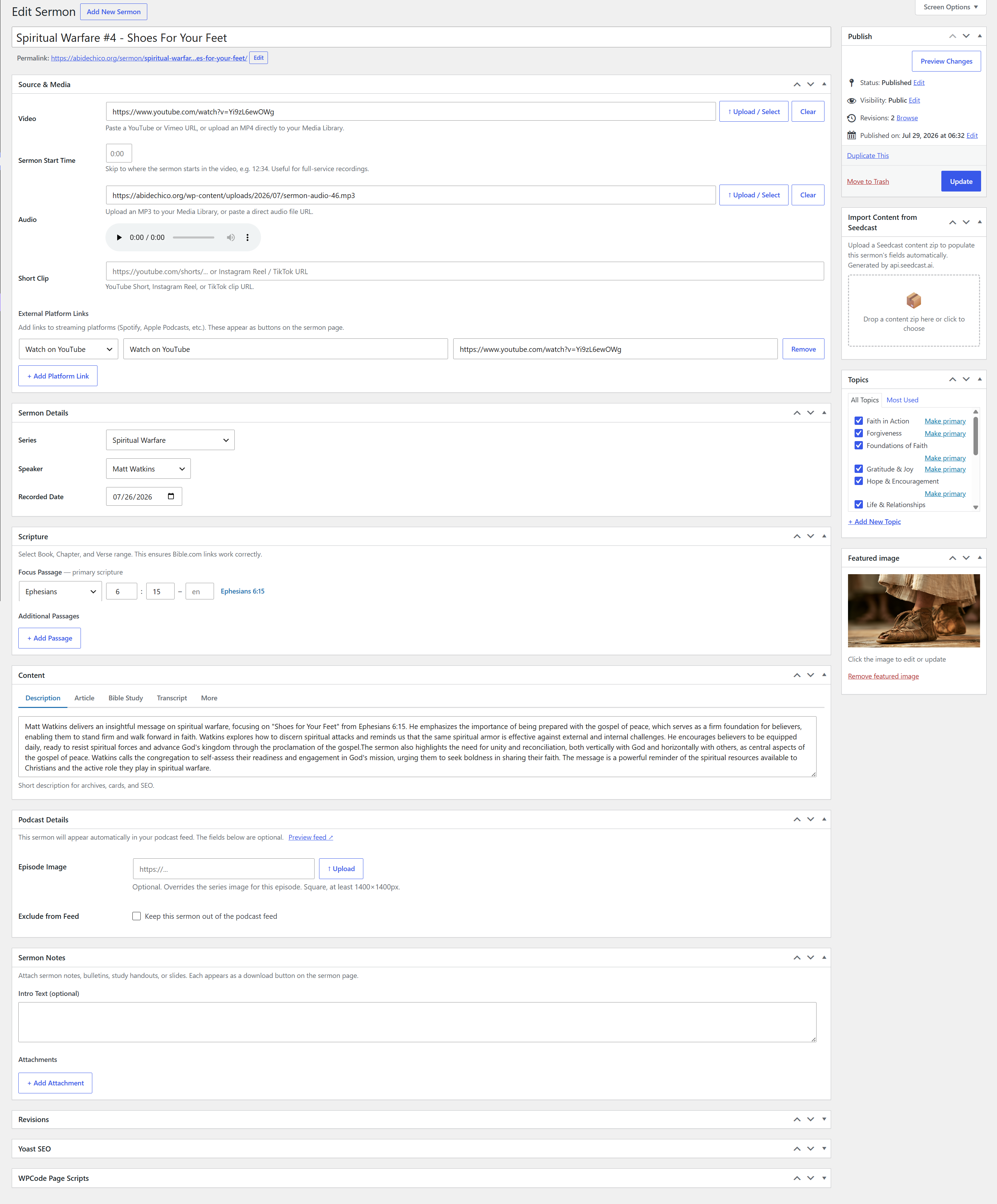
Sermon Library gives every sermon a full record: the video, the audio, a written article, a Bible study, the transcript, and the sermon notes. Each one is a tab on the sermon page, each one is downloadable as a PDF, and all of it is indexable by search engines. Someone who cannot make it on Sunday, or who is quietly working out whether to visit at all, gets the whole message rather than a play button.
Everything described below is in the free plugin.
See it in action
A church running Sermon Library on a live site:
- Sermon page with video, transcript, article, Bible study and scripture panel
- Sermon archive built from shortcodes, with live filtering
- Series listing
- Speaker profile
Already using another sermon plugin?
Sermon Library imports from the two most common ones, and it does the work for you rather than handing you a spreadsheet.
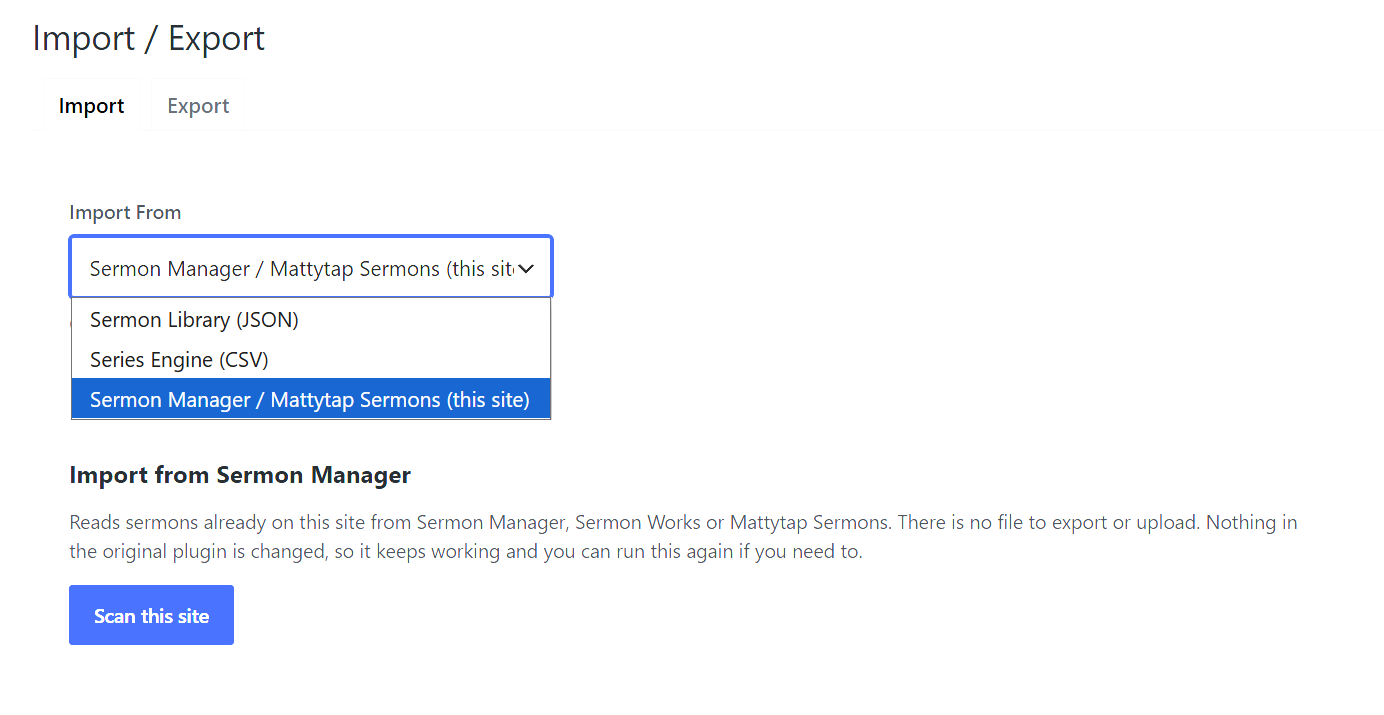
From Sermon Manager, Sermon Works or Mattytap Sermons. One click, on this site. There is no file to export and nothing to upload: the importer reads the sermons already in your database. It scans first and shows you what it found, then imports on your say so, and it never modifies the original plugin’s data, so you can compare the two before switching anything off. The old plugin does not even need to be active. If you already deactivated or deleted it, your sermons are still there and this will find them.
Your preachers and series stop being tags and become real pages. A taxonomy term can hold a name and not much else; a speaker in Sermon Library has a headshot, a bio, a title, social links and their own profile page, and a series has cover art, a description and a date range. Whatever your terms already carried comes across, and the rest is waiting to be filled in.
The importer also tidies up on the way through. Plugins that let you type a preacher’s name into a tag box tend to accumulate “Matt”, “Matt Watkins” and “Pastor Matt” as three separate people with three separate archive pages. The scan groups those together and lets you choose which to keep before anything is written.
From Series Engine. Upload your CSV export and the importer parses it, shows you every series it found, and lets you map each one to a new or existing series, or skip it. Nothing is written until you have reviewed that mapping.
Every sermon, fully documented
- Video, audio, article, Bible study, transcript and sermon notes, each per sermon
- Every written format downloads as a formatted PDF your congregation can keep
- Tabbed sermon page that keeps inactive content in the markup, so search engines index all of it
- Series with cover art, descriptions and their own archive page
- Speaker profiles with bio, headshot, contact details, social links and a full sermon listing
- Topics for browsing by theme
- Sermons fall back to their series artwork, and then to a default image you choose
Scripture that is actually structured
- Passage picker with book, chapter and verse, so references are consistent no matter who enters them
- Every passage links out to Bible.com or BibleGateway, in the translation you choose
- Filter the whole library by book of the Bible, which is how people who are studying a book actually search
An audio feed you can submit anywhere
- iTunes-compatible RSS, ready for Apple, Spotify and every other listening app
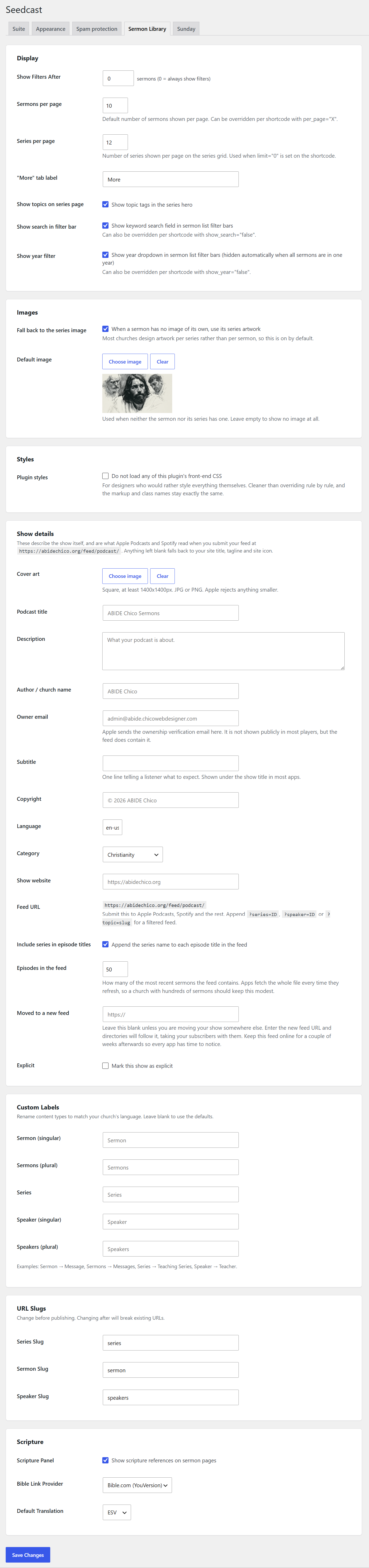
- Show settings for cover art, title, subtitle, description, author, owner email, copyright, language and category
- Filtered feeds per series, speaker or topic, so a study series can stand as its own show
- Per sermon control over audio length, file size, episode art and whether it appears at all
- A redirect field for the day you move your show somewhere else, so your subscribers follow
Built for the way churches actually run their sites
- Works with any theme. Fonts and colours are inherited from your theme rather than overridden
- Tested with Elementor and Divi, which is what most church sites are built on
- Every template can be overridden from your theme folder
- Turn the plugin’s CSS off entirely if you would rather style it all yourself
- Visual shortcode generator, so there is nothing to memorize
- Four appearance presets if you would rather not touch CSS
Shortcodes
[scsl_sermon_list]: paginated sermon list with a full filter bar[scsl_series_grid]: grid or slider of series[scsl_speaker_grid]: grid or slider of speakers[scsl_latest]: the most recent sermon[scsl_topic_list]: grid of topic pills
Found by search engines and AI assistants
- JSON-LD structured data for VideoObject, AudioObject, Person and BreadcrumbList
- Meta description, Open Graph and Twitter Card tags, which step aside automatically if Yoast, Rank Math, AIOSEO or SEOPress is handling them
- Real URLs and working pagination on first load; filtering only switches to AJAX once someone uses it
Who this is for
Churches and ministries that want their teaching to be findable, readable and shareable rather than locked inside a video player. It suits a church of forty as well as one of four thousand: there is nothing to configure before it works, and nothing you outgrow.
Screenshots



Installation
- Upload the
seedcast-sermon-libraryfolder to/wp-content/plugins/ - Activate the plugin through the Plugins menu in WordPress
- Permalinks are refreshed automatically on activation
- Go to Sermon Library in the admin menu to start adding content
Moving from another plugin? Go to Sermon Library > Import / Export and choose your existing plugin from the list. Import it before you deactivate anything, so you can compare the two.
FAQ
-
I use Sermon Manager. Can I move my sermons across?
-
Yes. Choose Sermon Manager on the Import / Export screen and click Scan. It reads the sermons already on your site, whether they came from Sermon Manager, Sermon Works or Mattytap Sermons, and shows you what it found before writing anything. Your existing plugin and its data are left exactly as they are.
The old plugin does not have to be active. If you already deactivated or deleted it, your sermons are still in the database and this will find them.
Preachers and series become full profile and series pages rather than taxonomy terms, so they gain a headshot, a bio, cover art and their own descriptions. Sermons keep their audio, video, scripture reference, date, image, notes, bulletins, view counts and publication status.
-
What happens to duplicate preachers and series?
-
The scan finds them and shows you. Any plugin that lets a name be typed freely into a tag box ends up with several spellings of the same person, each with its own archive page. Sermon Library groups the likely duplicates, suggests which record to keep, and lets you merge them before the import writes anything. You can also choose to leave them separate.
-
Can I try the import without committing to it?
-
Yes, in two ways. The scan is read only, so you can look at what would happen and stop there. And when you do import, you can bring everything in as drafts, check it, and publish when you are happy. Nothing in your old plugin is changed either way, so both plugins can run side by side while you compare.
-
I have a podcast listed on Apple. Will migrating break it?
-
Only if you skip a step, so do this one first. Your feed URL changes when you move, and directories need telling. Before deactivating your old plugin, set its podcast Redirect field to your new feed URL, which you will find under Settings in the Sermon Library section. Leave both running for a couple of weeks so every app has time to follow, then switch the old one off. Your subscribers come with you.
-
Can I import from Series Engine?
-
Yes. Export your sermons from Series Engine as CSV, then upload it on the Import / Export screen. The importer parses the file, lists every series it found, and lets you map each one to a new series, an existing one, or skip it. Nothing is written until you have reviewed that mapping.
-
Can visitors download the sermon transcript?
-
Yes. Transcripts, articles, Bible studies and sermon notes each get a PDF download button on the sermon page. Nothing extra is required.
-
Can I submit the audio feed to Apple and Spotify, and can one series have its own?
-
Yes to both. The RSS feed is iTunes compatible, and the show settings cover everything Apple checks for, including the owner email it uses to verify ownership and the artwork requirements. Your feed URL is on the Sermon Library settings screen.
For a single series, speaker or topic, append
?series=ID,?speaker=IDor?topic=slugto that URL. The result is a feed containing only those sermons, which can be submitted separately. -
Can people search sermons by book of the Bible?
-
Yes. Scripture is entered through a structured picker rather than a free text field, so the whole library can be filtered by book, and every passage links out to Bible.com or BibleGateway.
-
Does it work with Elementor and Divi?
-
Yes. All five shortcodes render inside page builders, and the styles load in the Elementor editor as well as on the front end.
-
What permalink structure is required?
-
Sermon Library requires a non-plain permalink structure. Go to Settings > Permalinks and choose “Post name” or any other option besides “Plain.”
-
Can I override the templates?
-
Yes. Copy any template from
wp-content/plugins/seedcast-sermon-library/templates/towp-content/themes/your-theme/seedcast-sermon-library/and edit freely. -
Does this affect my existing content?
-
No. Sermon Library adds its own post types and taxonomies. Your posts, pages and any other plugin’s content are untouched.
-
What happens if I deactivate the plugin?
-
Your sermons, series and speakers stay in the database. Deactivating hides them from the front end; it does not delete anything.
-
What PHP version is required?
-
PHP 7.4 or later. The plugin is tested against 7.4 on every release.
-
Are there external service calls?
-
Scripture links point to Bible.com (YouVersion) or BibleGateway, and only when a visitor clicks a passage link. No data is sent automatically.
-
Does it work with Yoast SEO or RankMath?
-
Yes. When a dedicated SEO plugin is active, Sermon Library steps aside and lets it handle meta descriptions, Open Graph and Twitter Card tags. Structured data for sermons is still added, because SEO plugins do not know what a sermon is.
Reviews
There are no reviews for this plugin.
Contributors & Developers
“Sermon Library” is open source software. The following people have contributed to this plugin.
Contributors
Translate “Sermon Library” into your language.
Interested in development?
Browse the code, check out the SVN repository, or subscribe to the development log by RSS.
Changelog
2.3.0
Importing
- Added a one click importer for Sermon Manager, Sermon Works and Mattytap Sermons. It reads the sermons already on the site rather than asking for a file, and changes nothing in the original plugin. The old plugin does not need to be active, so a site that already removed it can still recover its sermons.
- The importer scans first and reports what it found, including duplicate preachers and series, which you can merge before anything is written.
- Choose whether to import everything as drafts or to match the publish state of the original.
- Preachers and series become full speaker and series pages, carrying across whatever description the original term had.
- Notes and bulletins come across as downloadable files on the sermon, labelled from the attachment title.
- Scripture references that cannot be read as a book, chapter and verse are listed for you rather than guessed at, and are imported as written.
- Re-running the import updates what came across the first time instead of duplicating it.
- Fixed: the Series Engine importer was missing its upload step entirely, so there was no way to choose a CSV.
- Fixed: the Series Engine series mapping screen showed internal label names such as “slImportI18n.importAs” instead of the labels themselves, and series titles containing an ampersand displayed as “&”.
Audio feed
- Added show level settings: cover art, title, subtitle, description, author, owner email, copyright, language, category, show website, and an explicit flag.
- Fixed: the feed hardcoded its language, category and explicit flag, and carried no owner email at all. Apple requires one to verify ownership, so the feed could not be submitted before this.
- Every field falls back to your site title, tagline, admin email and site icon, so a feed you never touch is still valid.
- Cover art is stored as a media library reference rather than a URL, so the full size image is used in the feed. Apple rejects artwork below 1400×1400.
- Added a limit on how many episodes the feed contains, defaulting to 50. It was previously fixed at 200, which is a large file for apps to fetch on every refresh.
- Added a “moved to a new feed” field. If you ever relocate your show, this is what tells directories to follow, so your subscribers go with you.
Images
- A sermon with no image of its own now falls back to its series artwork, then to a site-wide default image you can set. Applies everywhere: sermon pages, archives, shortcodes, structured data and the feed.
- Added an option to load none of the plugin’s front-end CSS, for designers who would rather style everything from scratch. The markup and class names are unchanged.
Compliance
- File reads and deletes in the content importer now go through WP_Filesystem, so they work on hosts where WordPress writes over FTP or SSH rather than as the web user.
- The bundled shared library now adopts the plugin’s own text domain, so its strings are translated alongside the rest of the plugin.
Settings and admin
- Settings moved to Settings > Seedcast, in one permanent place alongside any other Seedcast plugin you run. The Settings link under the Sermon Library menu goes straight there.
- Theme choice is now shared across Seedcast plugins, so they match without configuring each one. Your existing choice is carried over on update.
- The Import Content box on the sermon editor moved to the sidebar, under Publish.
- Removed the Date Range and Topics columns from the Series list. Neither is an attribute of a series and both were always empty.
- Sermons now appear first in the menu, and Topics sits with the content screens rather than after the shortcode tool.
- Fixed: deleting a topic emptied the page instead of returning to the list. The topic was deleted, but the redirect could not run because the page had already started rendering.
- Fixed: the Series and Speaker pickers on a sermon listed only published records, so a sermon correctly linked to a draft appeared to have no series or speaker at all.
Appearance
- Front end output now inherits fonts and text colours from your theme instead of setting its own. Sermon pages, series pages and the shortcodes will look more like the rest of your site.
- Shared components (buttons, lists, filters, pagination, breadcrumbs, the audio player, video embeds) now come from a shared library rather than being duplicated, so they behave consistently.
- Removed the underline and fixed heading sizes that were being applied to section titles.
- Fixed: series artwork was forced into a square container, leaving dead space beneath landscape images.
- Fixed: the share divider on a sermon page drew even when there were no platform links above it.
- The X share button is now labelled “Share on X”.
Fixes
- Fixed: speaker pages referenced a variable that was never defined, producing a PHP warning on every view.
- Fixed: speaker pages ran one database query per sermon to build the series list, then one per series after that. Both are now a single query, which makes a large difference for speakers with a long history.
- Fixed: PDF download button labels were escaped twice.
- Fixed: share and Bible passage links used urlencode(), which encodes spaces as plus signs. Now rawurlencode().
- Fixed: the plugin declared PHP 7.4 as its minimum but used a PHP 8.0 function. Verified clean against 7.4.
- Fixed: the breadcrumb shown on the page and the breadcrumb sent to search engines were built separately and could disagree. Both now come from one source.
- Video embeds use YouTube’s privacy mode and Vimeo’s do-not-track flag everywhere, not just in some places.
Accessibility
- Settings sections are now real tabs with proper roles and keyboard support.
- The copy link button announces itself to screen readers instead of only changing its label.
- The theme picker shows a visible focus indicator for keyboard users.
1.7.0
- Changed: Custom post type slugs renamed from sl_ to scsl_ prefix for uniqueness
- Added: Automatic database migration runs on activation and update
- Added: JSON round-trip importer for migrating between sites
- Added: Sermon archive template at /sermon/
- Fixed: Scripture panel variable scope
- Fixed: Series hero image aspect ratio
1.5.0
- Added: Speaker grid shortcode [scsl_speaker_grid] with slider support
- Added: Speaker archive page at /speakers/
- Added: Separate headshot field for episode card thumbnail vs featured image for profile/card
- Added: Drag-to-reorder speakers in admin (same as series)
- Added: Automatic Yoast SEO / RankMath / AIOSEO configuration on first activation
- Added: Meta description, Open Graph, and Twitter Card tags when no SEO plugin installed
- Added: Export to JSON (Import / Export page)
- Added: Series Grid slider mode (slider=”true” attribute)
- Added: Series per page setting
- Added: Automatic permalink flush on plugin update, so no manual Permalinks save is needed
- Improved: Mobile layout across all shortcodes and templates
- Improved: Elementor editor CSS loading for all shortcodes
- Fixed: Series card click navigation
- Fixed: Stale JS cache causing click issues
- Removed: AI Integration settings (reserved for Pro)
- Removed: Raw transcript field (reserved for Pro)
1.4.0
- Added: Warm theme
- Added: Series Engine CSV importer with flexible series mapping
- Added: Scripture passage picker (Book, Chapter, Verse)
- Added: External platform links per sermon (Spotify, Apple Podcasts, YouTube, etc.)
- Added: Social share buttons (Facebook, X, LinkedIn, Copy Link)
- Added: Shortcode Generator admin page
- Added: SEO-friendly pagination
- Added: Drag-to-reorder series
- Added: Admin filters for sermon list (Series, Speaker, Topic)
- Added: Topics manager page
- Added: Podcast RSS feed
1.0.0
- Initial release